Features

Boost communication, productivity, and revenue with our powerful features.

A Platform Built for Service Businesses

We started with one simple goal: to make running a service business easier. Today, The Customer Factor delivers powerful features that handle the busywork—so you can focus on growth. From calendars to customer tracking, everything works together to boost productivity, improve communication, and prevent revenue loss.

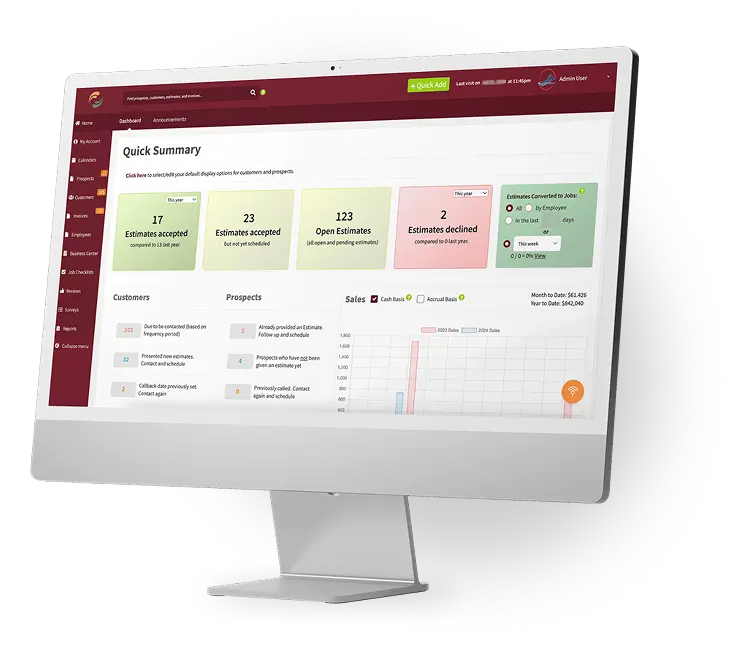
Quick Summary

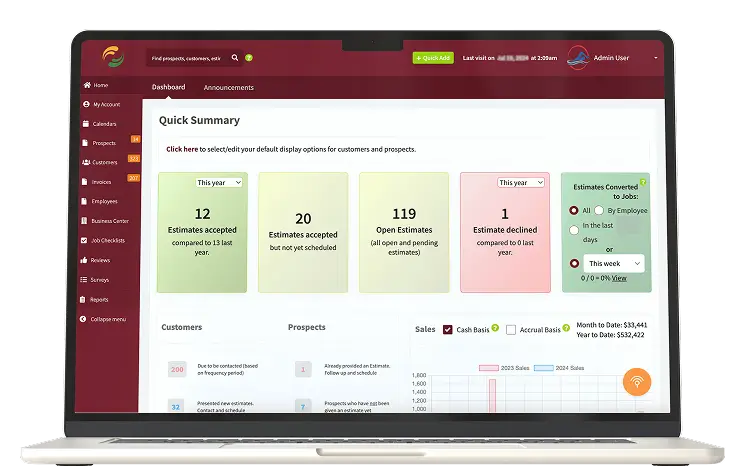
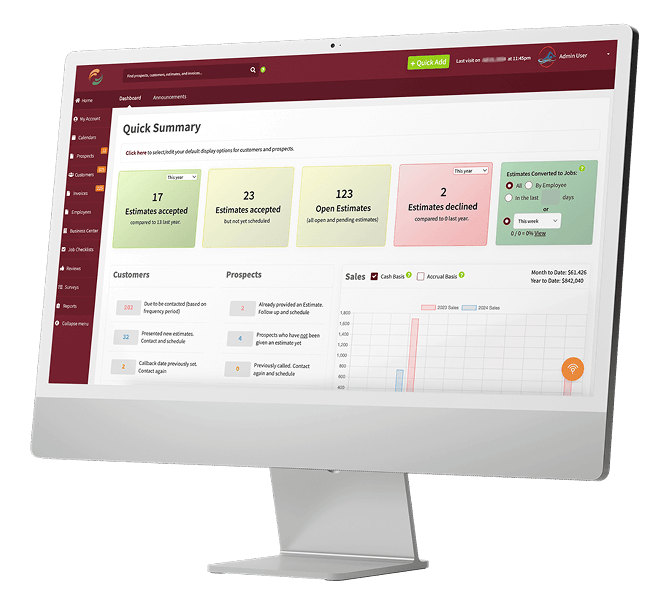
Here is your Dashboard. Check out the image on the left to see what kind of information is available to you.

You can immediately see how many customers are due to be contacted and how many prospects need to be followed up with.
Click on the desired link and call, send mass email, or send a personalized letter. No one falls through the cracks!

Oh…and see at a glance your estimate to job conversions, estimates accepted, open estimates, estimates declined, and what estimates need to still be scheduled. Complete summary information so you can act quickly!

Calendars Galore

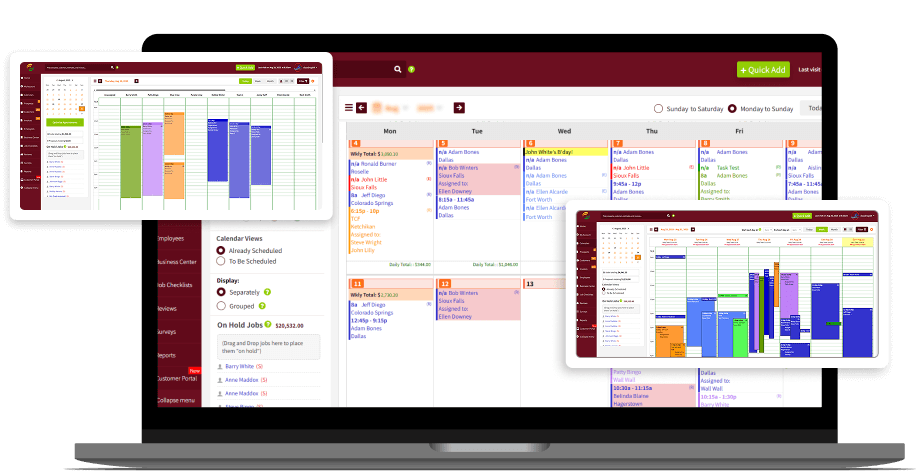
We’ve got the standard daily, weekly, and monthly calendars but we’ve taken it a step further than just the “standard”.

We have calendars within calendars. This is serious stuff. Many different views (appt type, employee, crew, list, display, etc.) are available along with filters galore to give you the exact info you want to see! You can also email/print work orders, invoices, and estimates from the calendars with one click.

And you can optimize your appts (map them), pay multiple invoices, process payments for customers with stored credit cards, create tasks, and personal appointments, and so much more! Our calendars are built to save you some serious time!

Estimates

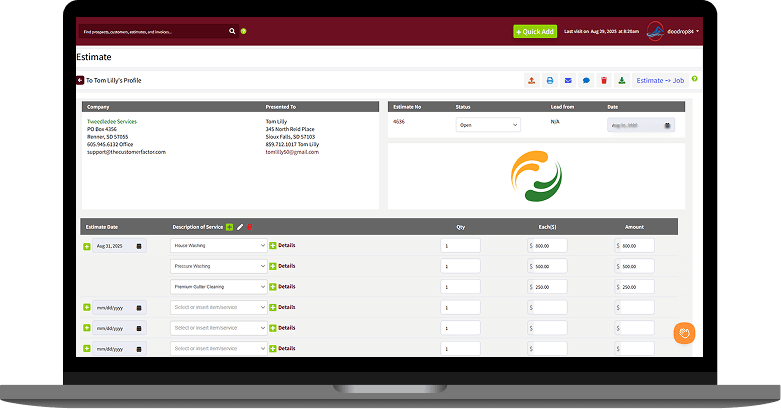
Ah…the lifeblood of any service business. As you know not every call or contact becomes a job right away, so we put them in as “prospects” or you can create estimates for existing customers.

Create personalized estimates with different templates, customization options, font style changes, and a whole bunch of other options such as the ability to set default discounts, default surcharges, or default “deposit due” requirements.

You can create and send estimates from either the software or the mobile app with ease. And when the estimate is accepted you can turn it into a job with one click (actually no clicks if you have the proper option selected that turns accepted estimates into jobs immediately).

Multi-page Proposals

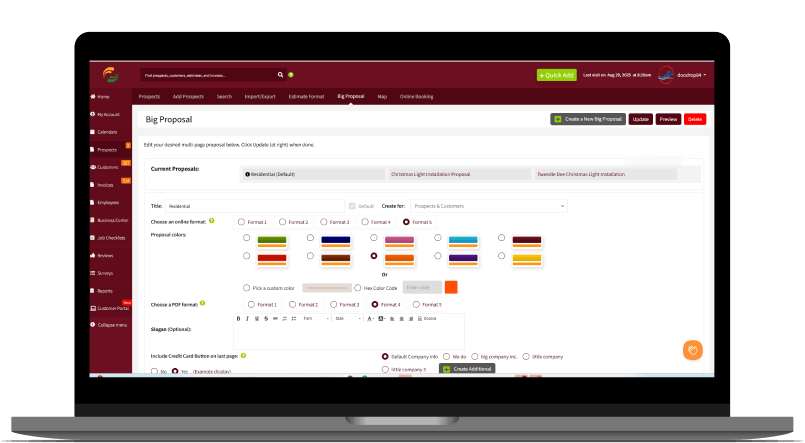
Question. If you received an estimate from a service business would you be more impressed with a single page estimate that basically just shows you pricing or a multi-page proposal that tells a complete story? The answer is obvious. We hear this time and time again from our users. That’s why we built our multi page proposal feature. When you use it you’ll never go back to single page estimates.

Include customer reviews, an insurance doc, before and after photos, an agreement, pricing info, have them sign if that’s your preference, and include an intro page and closing page. We have it all built for you already. Most users create one multi-page proposal template for residential and one for commercial. And guess how long it takes to actually create one and send it? The exact same amount of time it takes to create and send a single page estimate! So it just makes sense to send multi-page proposals. You will see your closing rates increase dramatically!

Automated Email Follow ups

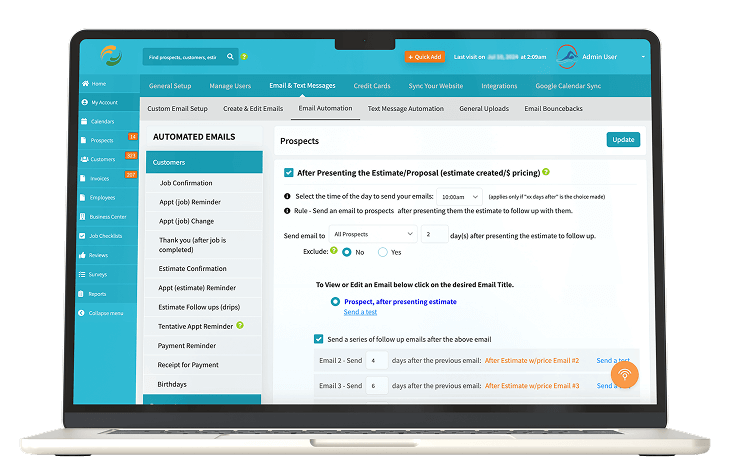
Automation is a wonderful thing. The goal here is to get you working smarter, not harder. So why not automatically set up your follow up emails to go out at predetermined times?

Example: Above we mentioned our multi-page proposals, so let’s say you send out some proposals. If you set up your follow ups then a personalized email can be sent automatically 3 days later, another one 5 days later, another one 7 days later, etc. We have 7 high impact follow ups that we created for you that you can put in play.

Or let’s look at another example. You provide your services and you want to follow up with customers 6 months later for a repeat service. We have a unique set of automated follow ups that can be triggered to start getting sent 6 months after any service is done. Again, we have 7 well crafted follow ups for you to use. So many automated options for you to choose from there is not enough room here to describe ‘em all. Literally set and forget!

Invoices

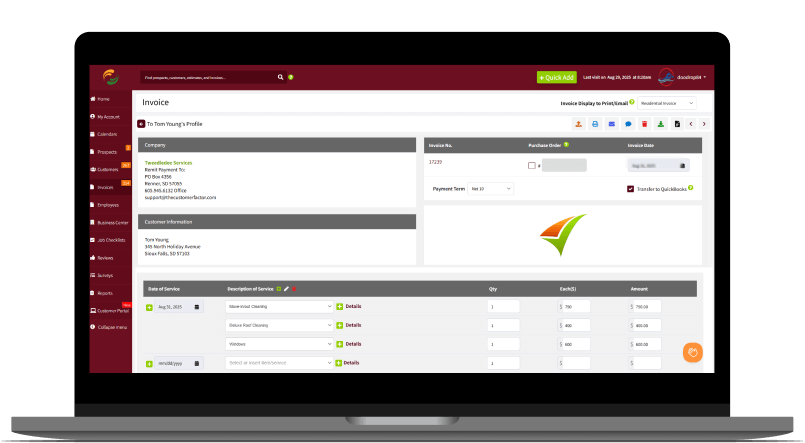
We have 6 different fully customizable invoice formats. Upload logo, insert your own personalized text, add a coupon, and choose from literally dozens of different customizable display options.

With our extensive customization capabilities, you’ll be able to create the perfect “look” to your invoices so that you can present professional invoices to your customers. Email, print, or send via SMS from the software or within the mobile app.

Credit Card Processing

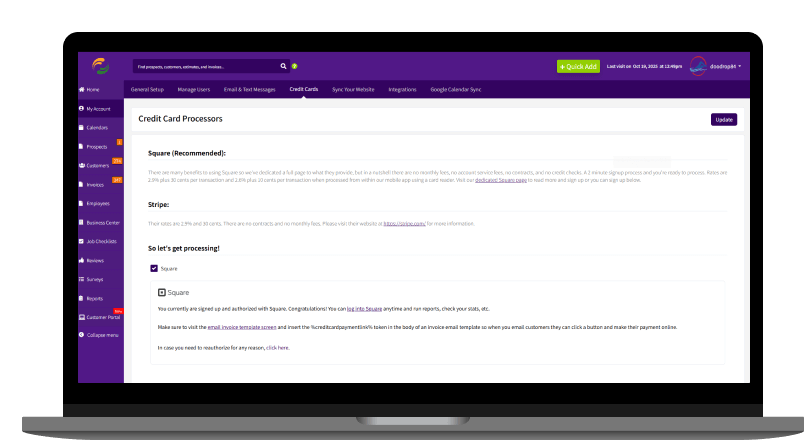
We have integrated with 2 credit card processors, Square and Stripe. Insert a credit card payment link into the body of the invoice email or SMS message template, send it to customer, and they can simply click to make payment. It is that easy.

And during the payment process customers can easily add tips (they add up). Back in the software the invoice automatically gets marked as paid and you’ll get an email letting you know payment was made. And a receipt automatically gets sent to your customer. 1 to 2 days later the money is deposited in your bank. Ca-ching!

Email Automation

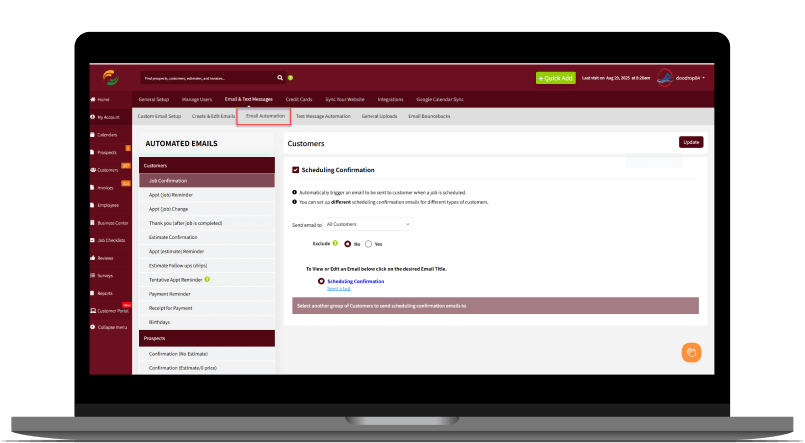
You can never have enough automation when it comes to running a service business. So we have you covered when it comes to automation. Completely hands off. Job confirmations, Appointment reminders, thank you notices, receipts, payment reminders, appt change notices and more!

You can also automate notifying your employees when they’ve been assigned to jobs. So you assign Sam Smith to a job and Sam Smith can receive an email and/or SMS message letting him know the details of the job he has been assigned to.

Automated Text Messaging

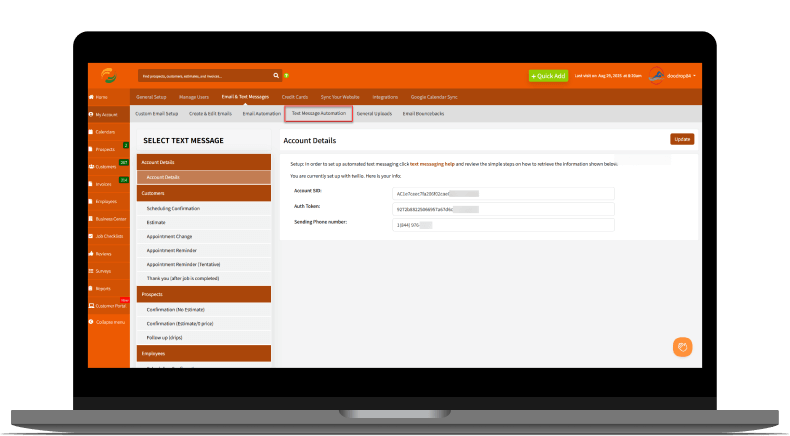
We have integrated with another company that allows us to provide full text message automation within our software. Similar to our email automation you’ll be able to send confirmations, appt reminders, thank you text messages, and more to your customers.

We’ve included character counters to ensure your messages aren’t too lengthy along with sample text messages for you to pick from and use “as is” or edit to better fit your business.

Between our automated emails and automated text messaging, your customers will be thoroughly impressed with your communication! We hear this from so many users. From the moment estimates are created and sent to estimates being converted to jobs to when the jobs are done your customers will know every step along the way what’s happening.

Photograph & Document Uploads

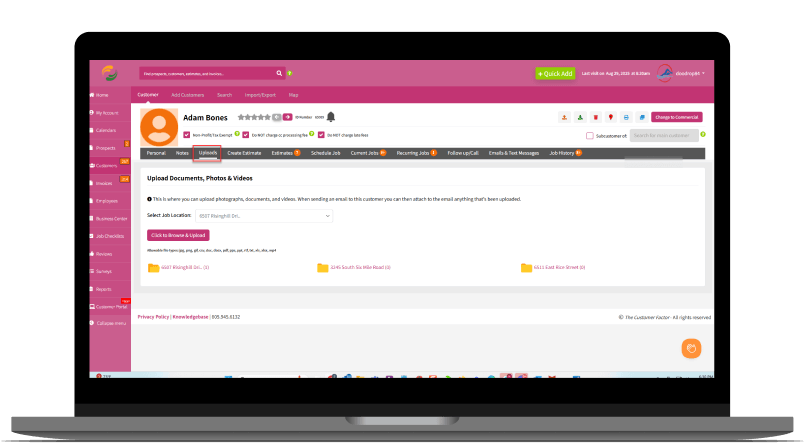
Upload any number of photographs, documents, and/or videos. This section will also display a pdf doc for any accepted estimate and for any credit card authorization that was submitted by customer (assuming you require customers to keep a credit card on file). All automatic.

For photos and videos, most of the time this is done within our mobile app. There is a “Photo” and “Video” button for any prospect or customer. So if you do an in person estimate or need to take some photos or videos while on a job site you can easily do it within the mobile app and they will be part of their profile forever!

Letters & Labels

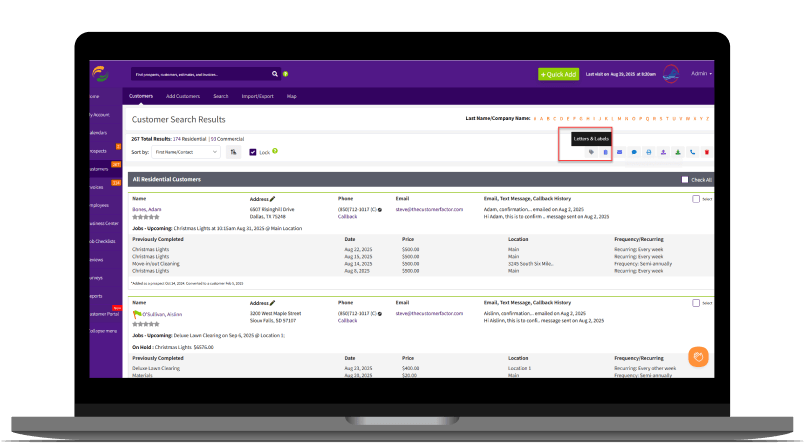
Besides being able to personalize emails and text messages within The Customer Factor, you can also personalize letters (postcard mailing coming soon). It might be a bit “old school” but sending letters to customers is a definite plus. Strengthen your relationships even more. You can print and send reminder letters, follow up letters, thank you letters, special “new service announcement” letters, and much more. You can print an individual letter or multiple letters all with a single click of a button.

If you’re doing any bulk mailing you can use our print label feature to print out mailing labels in black color or choose from 6 other colors. This letter feature will really maximize your relationships and increase your bottom line profits!

Daily Reminders

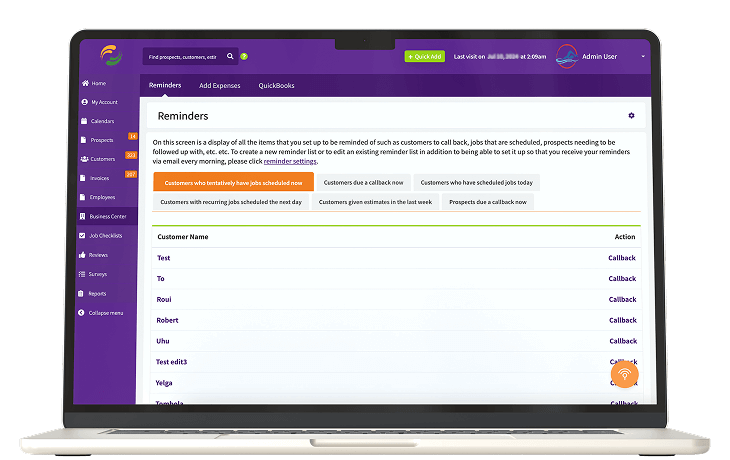
How would you like to be reminded every morning what needs to be done that day? This is about as automatic as it gets. Simply choose what you want to be reminded of and you can then select to receive your reminders via email.

And daily just like clockwork, you’ll receive an email with a complete list of what you need to do for the day. In addition to this, you can set it up for your employees to received automated emails reminding them of the appointments that they’re assigned to.

Employees & Crews

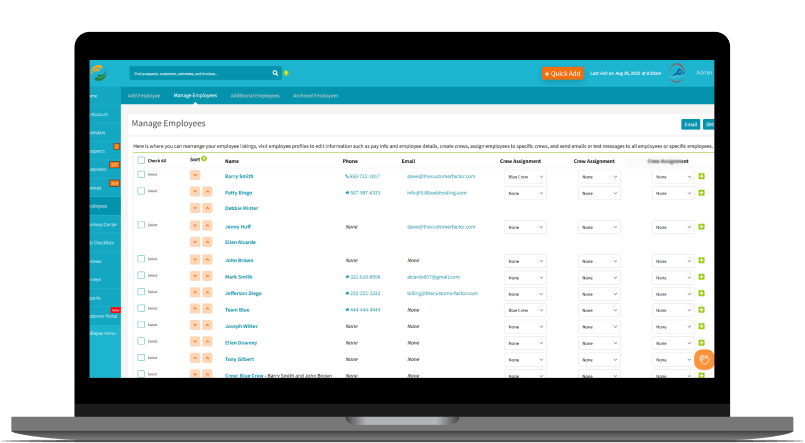
Add employees and create crews. You’ll then be given an option when scheduling to assign any job or estimate to a specific employee or crew.

Keep track of their pay, email or send messages to any employee, track PTO, Vacation days, sick days, upload important docs into their profile and filter appts on the calendars based on any employee or crew. And you can even upload a photo and some bio information to their profile which can be included in the email to customer (if that employee is assigned to the job then the automated confirmation and appt reminder will automatically include employee photo and bio info in the email if you set it up to do so).

And of course…set up any employee with their own login information where they can log into the mobile app and see what jobs they’re assigned to.

Custom Fields

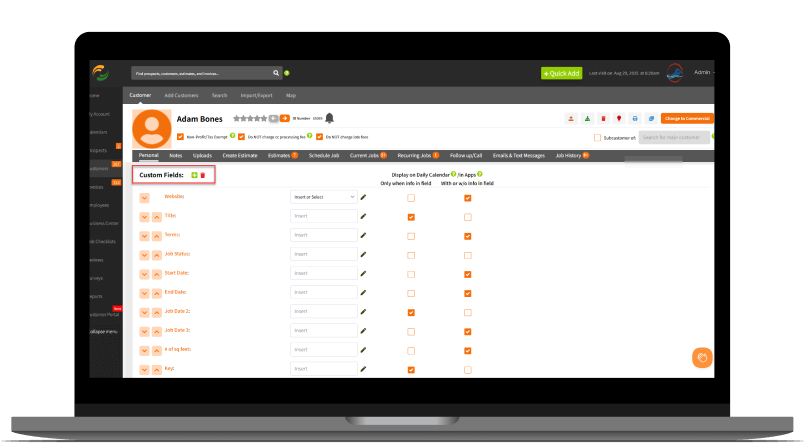
Create an unlimited number of custom fields. When you create them once they carry across all prospect and customer profiles. There are so many uses for this feature that we can’t even scratch the surface of what you can do.

Want to keep track of birthdays? Do you want to list pricing for each item or service you provide to a customer? Need to keep track of their square footage? Or maybe you just want to include their website for future reference. And you can search for custom fields and even include custom field info within emails. So many uses for custom fields. And again, it’s unlimited!

Track Your Expenses

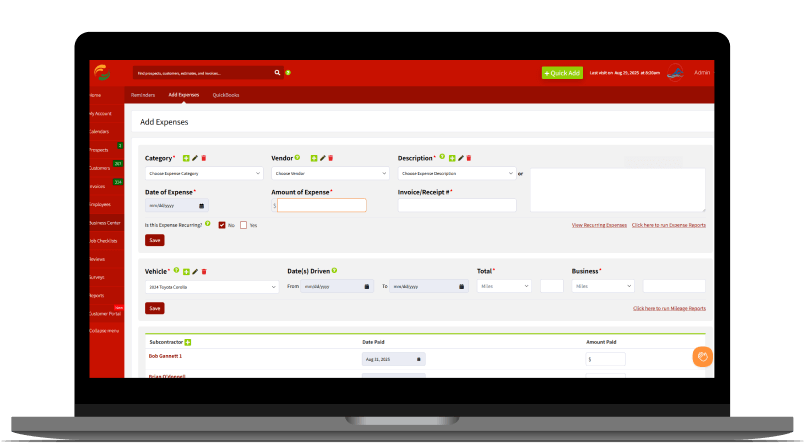
In order to provide accurate Profit & Loss reports for your business, there needs to be expenses, so here you go! Insert any expense by selecting the category, date, vendor, a description, amount, etc. If it’s a recurring expense like monthly insurance you can even just set it up once and forget about it.

We recently introduced a “Receipt” feature into the mobile app, so right on the dashboard in the app you can click a button and scan your receipts! Can’t get any easier than that. So when it comes time to run your reports, boom…you’ve got everything recorded come tax time.

Reports

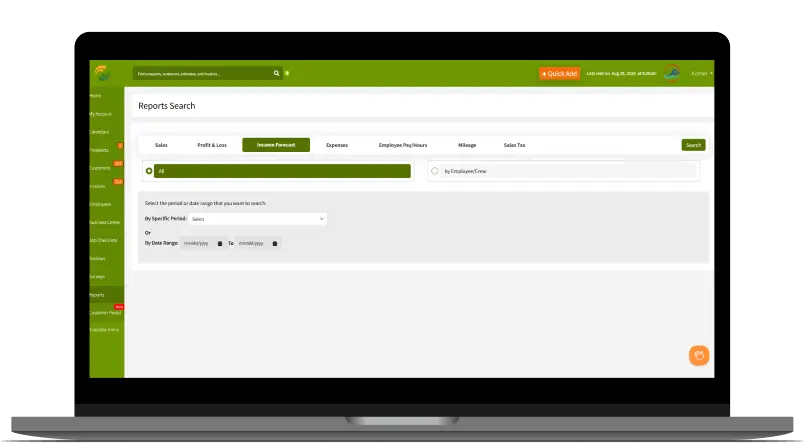
The Customer Factor provides you the ability to search for any kind of report you need. Sales, Profit & Loss, Employee pay/hours/mileage, Sales tax collected, Expenses, Income Forecast, how many estimates you’ve presented, what marketing method works best, customers scheduled within certain time frames, customer who haven’t been serviced in x number of months/years, and literally dozens more!

You can even retrieve reports that tell you how much money you made for a specific job that you provide to customers, the # of customers who had that job done, and how much the average amount of money you made “per customer” for that job. And even break it down by city or state if you want to. Bottom line…our extensive reports will give you the information you need when you need it!

Income Forecasting

This is actually a “Report” so it could just be included in the above “Reports” section and left at that. But this is too powerful to not talk about further. How would you like to know what you might earn next month, next quarter, next year or any date in between? That’s what this income forecasting feature is all about.

It allows you to peek into the future. The Customer Factor crunches the numbers and then provides you with what your forecasted earnings will look like for whichever time period you searched for. Future income is not guaranteed of course, but if you use The Customer Factor regularly to follow up and contact your customers, there is a great chance your income forecast will come true. Highly motivational!

Google Maps Integration!

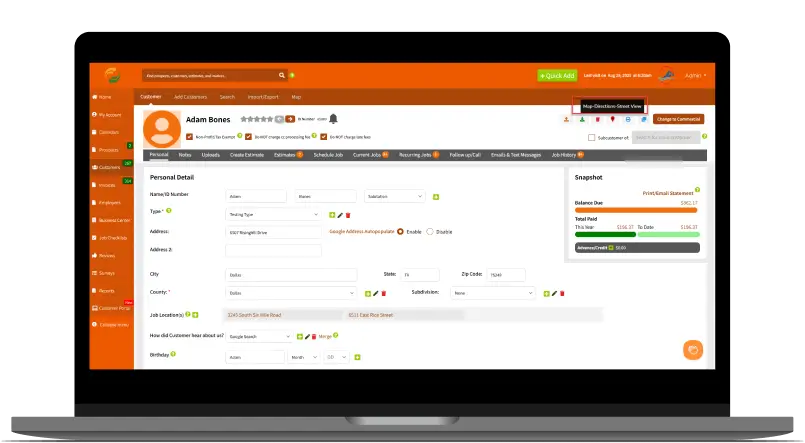
We have a complete integration with Google maps. Most users simply navigate to the job or estimate by clicking on the teardrop next to the appt in the mobile app. However, you can also print directions from within any profile as you can see on the left. There is even a street view in both the mobile app and software for you to get a visual of the property.

And for the ultimate in simplicity you can print directions for all your appts on any given day right from the daily calendar. You’ll be able to click one button and print directions to appt #1 from your default address along with directions to appt #2, to appt #3, etc. Hint: Make sure you apply the route optimization feature first and THEN print your directions.

Sync With Your Google Calendar!

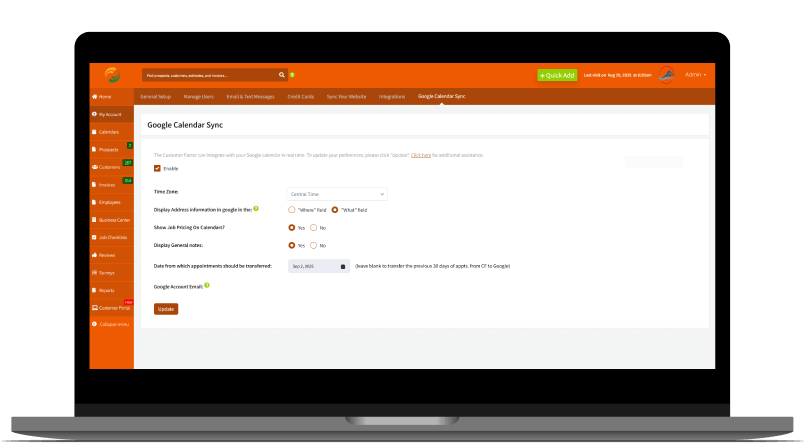
If you use google calendars, you’ll be glad to know that our calendars sync up with google. So when you schedule appointments in The Customer Factor, they’ll appear in Google almost simultaneously.

You can also share your google calendars with other subusers and even restrict their ability with what subusers can do to the appts. (ie: prevent them from editing or deleting appointments) from within the google calendars you’re sharing with them. Lots of functionality packed into this one feature!

Sync Your Website

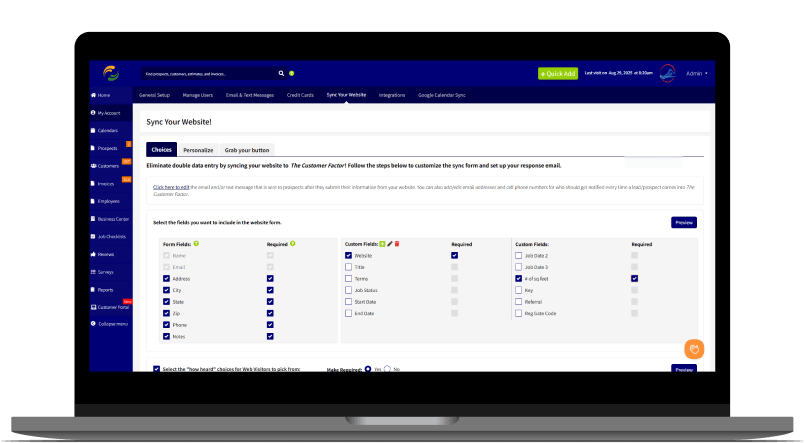
Connect your website to The Customer Factor and eliminate time spent on double data entry! You simply place the script available to you on any of your webpages. Choose from our buttons or create your own button. Or just link to a button already on your website.

So let’s say someone visits your website and is interested. They click the button, fill in their info, and submit. All their information transfers into your account. They will receive an email (which you can edit) and you’ll get an email also letting you know so that you can contact them right away.

QuickBooks Integration

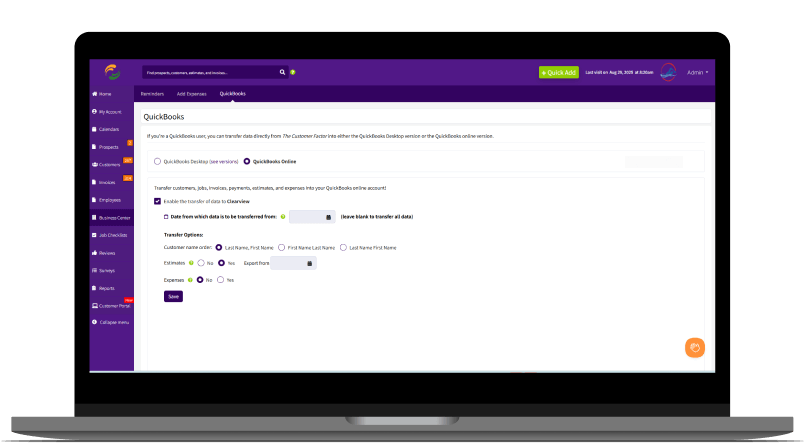
You are able to sync with either QB Desktop or QB Online, so we have you covered regardless which QuickBooks product you have. So if you need the extra accounting functionality that QuickBooks provides then this feature is for you. This feature is currently available in our “Pro” tier.

Since our middle name is “automation”, we set it up so all data from your account with The Customer Factor will sync to QB Online every morning around 3am, so any customer you add or edit or invoice you create or mark as paid within The Customer Factor will sync to QB Online automatically. As far as QB Desktop, this just requires 3 clicks to sync your data from The Customer Factor to QB. Easy Breezy!

Reviews

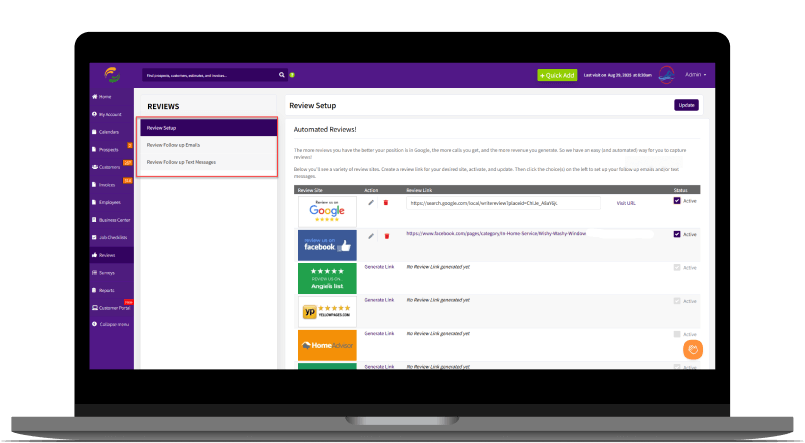
Whew…what can we say about this feature. Google reviews are critical to get your business traction. We all know that. If you are having trouble getting them then how about automating the process? There are companies out there that will sell you just this one single service but we include it within either our “Scale” or “Pro” pricing tiers. Similar to all of our other automation just set it up once and then forget about it.

We have all the sample review emails and text messages you need, so set up a combination of follow up review requests and just watch the reviews grow!

Route Optimization

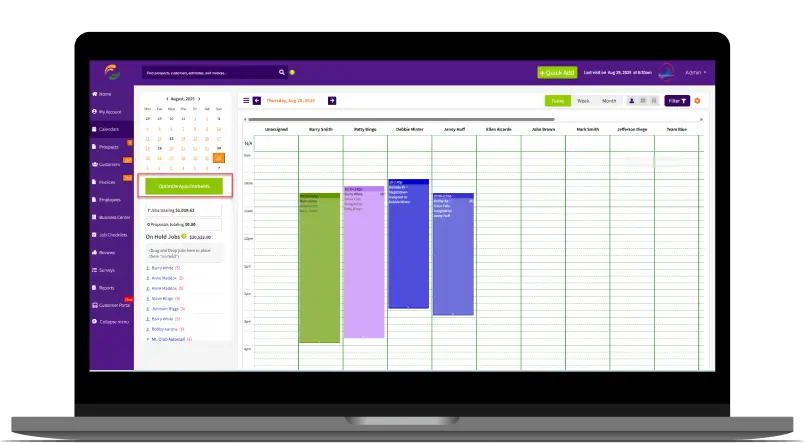
If you have a somewhat busy service business and you struggle to route your schedule correctly then this feature is for you. Currently available in our “Pro” pricing tier.

What a powerful feature. Click an optimize button on the daily calendar and your appts will display. Click one button and they all get shuffled around and put into the absolute best, most optimized route from appt #1 ‘til the very end. It’s like magic! Click to “save” and just like that your daily and monthly calendars in the software and the appts in the app will display in the proper optimized order.

Online Booking & Gift Cards

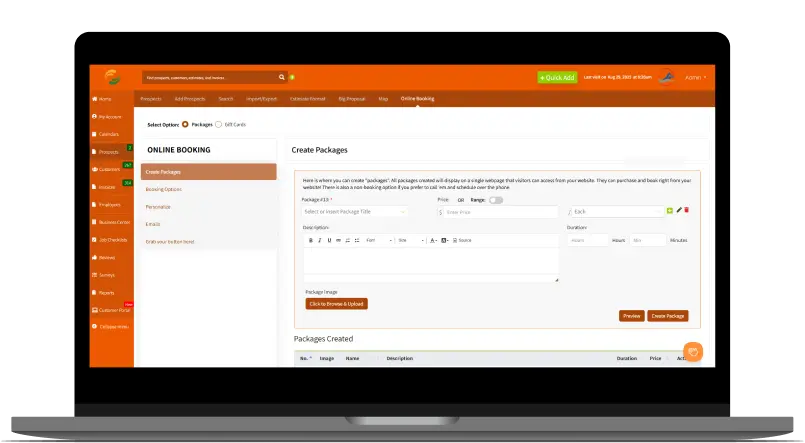
Available in our “Pro” tier this feature is swiftly becoming a user favorite. Put a button or link on your website and have existing customers purchase “packages”. You can ask for a deposit or no money at all. Or you can have them book or not book. If you do allow them to book they can only book based on your current availability which of course we can see from your calendars. Tons of options for you to choose from based on your preferences.

We’ve even combined our online booking feature with our gift card feature where you can sell gift cards online in different denominations! This feature really gives you that 1-2 punch.

Customer Portal

Available within our “Pro” tier your customers will be able to have their own personalized portal they can log into (one click login). They can make requests, see appts, view their invoices, store their credit cards, pay their bills, and much more!

This is about as easy as it gets for your customers. Within any email you send them just include the %customerportal% token and they can click the button and login and take care of business. Super simple for you and just as simple for your customers.

And Much, Much More!

We could spend hours listing all of the many features in The Customer Factor but the above is enough for now. There are so many more features for you inside to benefit from…all designed to help your business grow and save you precious time. PLUS we create new features all the time. It’s a never ending process, so we’re constantly innovating and improving in order to provide you the most powerful and efficient CRM that you’ve ever used!

Start experiencing the many benefits of

The Customer Factor today!

Start Your Free Trial

Get all the features and support. No contract required.